
To reset just the horizontal Scale field to its default setting of 100%, without affecting all the other text setting in the Character Palette ( Window>Type>Character), Press Command-Shift-X ( PC: Control-Shift-X)..
You can use this tips to reset the horizontal scaling of an entire selected text block or to simply change the setting in the Character Palette before you create another text object..


JUMP TO ANY LAYER JUST BY CLICKING IN YOUR IMAGE
You can jump to any layer in your document without going to the Layers palette. Press "v" to switch to the Move tool. Now, press-and-hold the Command key (PC: Control key), and click on an object on a layer in your image that you want, and you'll instantly jump to that layer.

To hide an individual layer, click on the Eye icon in the first column next to that layer in the Layers palette. To make the layer visible again, click on the spot where the Eye icon used to be. If you want to keep one layer visible and hide all the others, hold the Option key (PC: Alt key) and click on the Eye icon beside the layer you want to keep visible. To make the other layers visible again, repeat the process.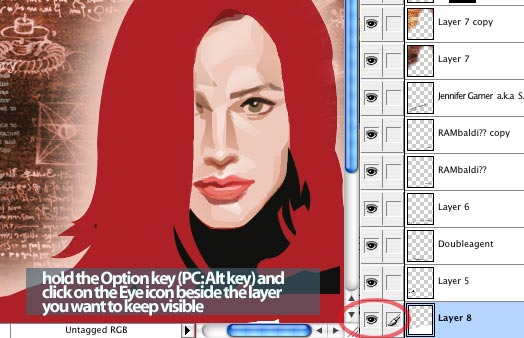
click image to enlarge
What, CRADLE Projekt?
Cradle stands for Corak Rekabentuk Alternatif Dalam Lakaran Ekspresif/Alternative Design Pattern in Expressive Perspective.
The projekt is devoted to all blogger that use blog/web as a medium to express their creativitism and idealism in Art, Illustration, Graphics, Comics Activities.
It's a small step taken by a art assemblage that called themselves Kembara as a medium for all Artist, Illustrator, Graphics Designer, Comicus to expressed their creativity.
Connecting and publishing artblogger creative contents and spread the message would revolt art. The concept of design architectural and creative development in one art assemblage, The ArtBlook Assemblage.
What, ArtBlook! Assemblage?
ArtBlook is inspired by the blogger all over the world that has published their journals in their blog in a book, so it was called a blook. ArtBlook stand for Art Blog Book.
Assemblage is a verb and has the definition of gathering, synonym like aggregation, assembly, association, collection, company, congregation, convergence, crowd, group, throng and in a easier way to tell is it's a collectives.
What is this Projekt For?
A creative human that observe the environment around to create something different and revolting to other. Someone that inspired and aspired to revolt art to the fullest and living and thinking outside the box.
Someone that strive individually and independently to show his creative side of thinking. If it a big show than a communites should gather to make it happen.
Any creative human that do not have a places to exhibit their right brain analogy. Any serious artist that need a route to be known in the world wide web.
Anyone that does Illustration, Drawing, Painting, Comics, Digital Art, Vector Art, Street Art, Graffiti, Graphic, Motion Graphic and any kind of Art And Craft. If you one of those creative human that wanted to share and show how you developed one art project, than it was you that we want. show your roght brain revolting creative art touch.
In a simpler way to make you understand it goes to anyone that has a blog and it's content are about art and craft and has a huge right brain.
Stay up for more newsinfo and update about CRADLE Projektfor more info --->http://cradleprojekt.blogspot.com/
By Leva Duell
You can find templates for every type of image typically used on a web page. From web page templates to header templates, banner templates, navigation buttons, order buttons, and ebook covers, you can find what you need on the Internet. Why would you consider using a pre-made template? Well, below you will find the top five compelling reasons for doing so.Save Time – Sure, you could make your own ... assuming that you have the graphic design skills, the software, and the time needed to put your graphic images together. However, most likely you will find your time better spent on developing and marketing your web site. What is your time worth? Even if you have the know-how and the right software, do you really want to spend your time on this time-consuming task? You would have a better chance of making money if you get your site online faster, and put more time and energy into marketing your site.
Save Money – The other alternative to creating your own web site and web images is to hire a professional designer. This would certainly save you time, but can be expensive – especially when you are creating multiple web sites. For about the same price you would pay to get one designer-made graphic, you could get a whole collection of quality, pre-made templates.
The Results – A high-quality web site with professional-looking graphics will instill confidence in visitors and promote sales. It has been shown repeatedly that using quality graphics can increase sales by 200 to 300 percent, and even more. If you don’t have the skills to design good images, and don’t have the budget to hire a professional designer to custom make them for you, then your best alternative is to invest in well-made templates. All you have to do is add your own text and you are ready to go. The result will be a greatly improved chance for increased sales.
Inspiration – Even if you do have the skills and time to produce your own graphics, coming up with the right image can be difficult. The blank canvass syndrome has plagued artists and graphic designers forever. If you have a collection of well-made templates on hand, then you have an almost unlimited supply of inspiration. You can either customize an existing template, or take one of the template ideas and create your own totally new image.
Availability – Pre-made, quality templates are readily available and generally economically priced. This makes purchasing templates a sound business decision.
Put your time and energy into the most productive tasks. Start using quality web templates to save time, increase productivity, and give a professional look to your web site.
Boost Credibility with Templates!
Header templates/web templates
FREE 34+ clipart and photo resources
Custom design of Web graphics
Article Source: http://EzineArticles.com/?expert=Leva_Duell

The main difference between Filter and Effect is Effect is more flexible where the object can be modified using Appearance palette (Window > Appearance) but this process uses to much of the computer's memory and processor's power.
In the other hand, Filter will immediately and totally change the object's anchor points and path segments and you won't be able to modify the changes after applying Filter. Applying Filter to an object is much more faster than applying Effect (if the object is complicated with many paths)
Below is an example of the difference.


