


Now that Photoshop CS can really give you type in a circle, getting a perfect circle that you can add type to is not as obvious as you'd think.
To get this perfect circle, click on the Shape tools in the Toolbox and choose the Ellipse tool from the flyout menu. Then go up to the Options Bar, and in the second group of icons from the left, click on the middle icon, which creates a regular path, rather than a Shape layer or a pixel-based shape.
Then, hold the Shift key, and drag out your circle (the Shift key constrains the shape to a perfect circle). Now you can move your Type tool over the circle, and it will change into a Type on a Path cursor. Click on the circle, and get to typing.


If you're using the Pen tool, and you've created multiple paths within your document, these paths are totally separate, and are moved independently of one another.
However, if you want these paths to move as one unitcombine them. Just switch to the Path Selection tool, then go up to the Options Bar and click on the Combine button.
Now when you move one path, all the combined paths move right along with it.

USE YOUR LAST SETTINGS AND SAVE TIME
This is a tip that will save you time when you're making tonal adjustments using Levels, Curves, Color Balance, etc. (most anything that appears under the Adjustments menu under the Image menu). When you bring up one of the tonal adjustment dialogs, it always displays its default settings, but if you hold the Option key (PC: Alt key) when choosing it from the Adjustments menu, instead of coming up with the default settings, it will display the last settings you used in that particular dialog. You can also add the Option (PC: Alt) key to the keyboard shortcuts. For example, the shortcut to bring up the Levels dialog is Command-L (PC: Control-L), but if you add Option (PC: Alt) to those keys, the Levels dialog will open with your last-used settings.
Although there's no way to set a default size for your New document dialog (outside of creating an action to do it for you), there's a pretty cool little-known tip that lets you open a new document using the last settings you manually input. Just press Option-Command-N (PC: Alt-Control-N) and the New document dialog will appear using the last settings you input (rather than using the clipboard data to determine the new document size).
OPENING AN IMAGE AND CLOSING THE FILE BROWSER
Want to open multiple photos at once and have Photoshop close the File Browser for you? Just Command-click (PC: Control-click) on all the photos you want to open, then press Option-Return (PC: Alt-Enter). All the selected photos will open, and the File Browser will close.
Transform command in Illustrator CS makes it easy for you to to transform a vector shape accurately the fast and easy way. It is very useful in technical drawing and in creating FA for output.
Transforming Size
I've made a red square and as you can see on the Info Palette (1), the size is 3 cm x 3 cm. Same shown on the Transform Palette (2). I've also marked the square borders with guide lines so it'll be easier for you guys to see the changes.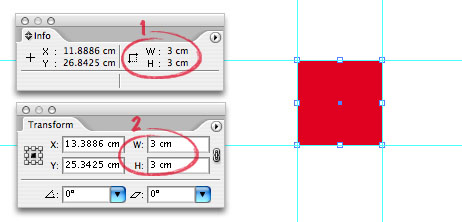
Now, I want to add another 0.75 cm to scale from the centre point.
(1) Select the reference point of transformation, the centre.
(2) Click on the constrain width and height proportions icon to lock it.
(3) Change either the width or height value to 3.75 cm and click Enter.
Can you see the difference (a bigger square and the new transformed size on the Info Palette).
Let say that I want to add another 0.75 cm but this time only to right side of the screen.
(1) Select the reference point of transformation, the center left.
(2) Make sure the constrain width and height proportions icon is not lock.
(3) Change the width value to 4.5 cm and click Enter.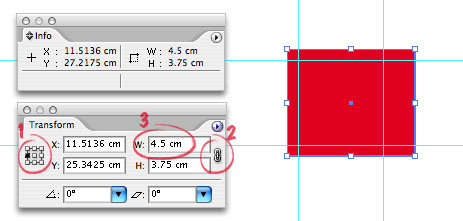
Rotating Shape
Now, I want to rotate it 45 degrees from the centre bottom.
(1)Select the reference point of transformation, the center bottom.
(2) Key in the angle of rotation and click Enter.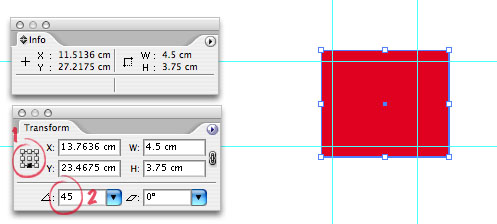
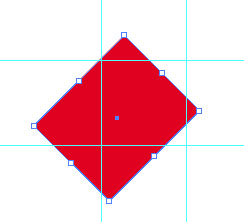
Easy, isn't. Same goes with shear (next to rotate). Try experimenting these features and have fun doing it.
so fast. Im still using PS CS1
Experience a rich new feature set for Photoshop. Macintosh users will encounter native performance on both PowerPC and Intel based Macs.
You can download the beta version here
Adobe Releases Beta Version of Photoshop CS3
Company Also Previews Adobe Bridge and All-New Adobe Device Central
SAN JOSE, Calif. - Dec. 14, 2006 - Adobe Systems Incorporated
(Nasdaq:ADBE) will introduce a beta version of Adobe Photoshop CS3 software, the next release of the world standard in digital imaging, on Friday, December 15th. Adobe is delivering a widely available Photoshop CS3 beta to enable customers to more easily transition to the latest hardware platforms, particularly Apple's new Intel-based systems. The beta is available as a Universal Binary for the Macintosh platform, as well as for Microsoft(r) Windows(r) XP and Windows Vista computers. The final shipping release of Adobe Photoshop CS3 is planned for Spring 2007. The software can be downloaded at: http://labs.adobe.com, in the early hours Pacific Standard Time on December 15.
Packed with new features, Photoshop CS3 beta also includes a pre-release version of a major upgrade to Adobe Bridge, as well as a preview release of the all-new Adobe Device Central. Photoshop customers can use Adobe Device Central to design, preview, and test compelling mobile content, created specifically for smaller screens. This new tool, integrated in the Photoshop CS3 beta, simplifies and accelerates the creation of mobile content through a preview environment and built-in device profiles.
"This is an exciting time for the Mac, and Adobe wanted to ease the move to new Intel-based systems with a preview release of Photoshop CS3," said John Loiacono, senior vice president of Creative Solutions Business Unit at Adobe. "We didn't want to leave Windows customers out of the party, so the beta is available to everyone in the creative industry's most passionate user community -- no matter what their platform choice.
We still have some surprises in store, but this beta gives customers an early chance to see the power of another great Photoshop release, optimized and tuned to run natively on the latest hardware and operating systems."
To utilize Adobe Photoshop CS3 beta, customers require a serial number from either Adobe Photoshop CS2, Adobe Creative Suite(r) 2, Adobe Creative Suite Production Studio, Adobe Design Bundle, Adobe Web Bundle or Adobe Video Bundle. Adobe Photoshop CS3 beta is available in English only. Customers who have a valid serial number for all other language versions of qualifying Adobe products can download the software. Without a serial number, users can still download Adobe Photoshop CS3 beta, with the product expiring after two days. Customers must register online with Adobe or have an existing Adobe.com membership account to access the software.
In related previews of future technologies, Adobe has also released two new web tools as beta releases. Adobe CSS Advisor is a new web-based community site to easily identify and resolve browser compatibility issues. Web designers and developers can contribute their own issues, comment on existing issues, or become an editor to participate in driving the site's future. The site is accessible at: www.adobe.com/go/cssadvisor. Also introduced is a beta release of Adobe Spry framework for Ajax, a designer-focused solution for adding the interactive power of Ajax when developing rich, dynamic web-sites. Adobe Spry framework for Ajax is available at: www.adobe.com/go/cssadvisor.
System Requirements
For Adobe Photoshop CS3 beta, recommended system requirements are as follows. For Macintosh: Mac OSX 10.4.8 or 10.5, 1 GHz PowerPC(r) G4 or
G5 processor, Intel based Macintosh. For Windows: Intel(r) Xeon(r) , Xeon Dual, Centrino(r) or Pentium(r) 4 processor, Microsoft Windows XP with Service Pack 2 or higher, Microsoft Windows Vista. Both platforms require 512 MB RAM and a 1024x769 resolution screen. Photoshop CS3 beta will expire soon after the launch of Photoshop CS3 in Spring 2007.
Details on final pricing, system requirements and availability have yet to be determined.


